Ayar POS · Web + Android Ayar POS · Web + Android

POS and business management for Myanmar shops မြန်မာဆိုင်များအတွက် POS နှင့် လုပ်ငန်းစီမံစနစ်

Ayar POS connects sales, stock, customer due, delivery and reports across Web and Android—so you always know what is happening in your business. အရောင်း၊ Stock၊ ဖောက်သည်ကြွေး၊ Delivery နဲ့ Report အားလုံးကို Web နဲ့ Android မှာ ချိတ်ဆက်ပြီး သင့်လုပ်ငန်းအခြေအနေကို အချိန်မရွေး သိနိုင်ပါတယ်။

No credit cardCredit card မလို Setup in 15 minutes၁၅ မိနစ်အတွင်း Setup Myanmar supportမြန်မာ Support
pos.ayarmm.com
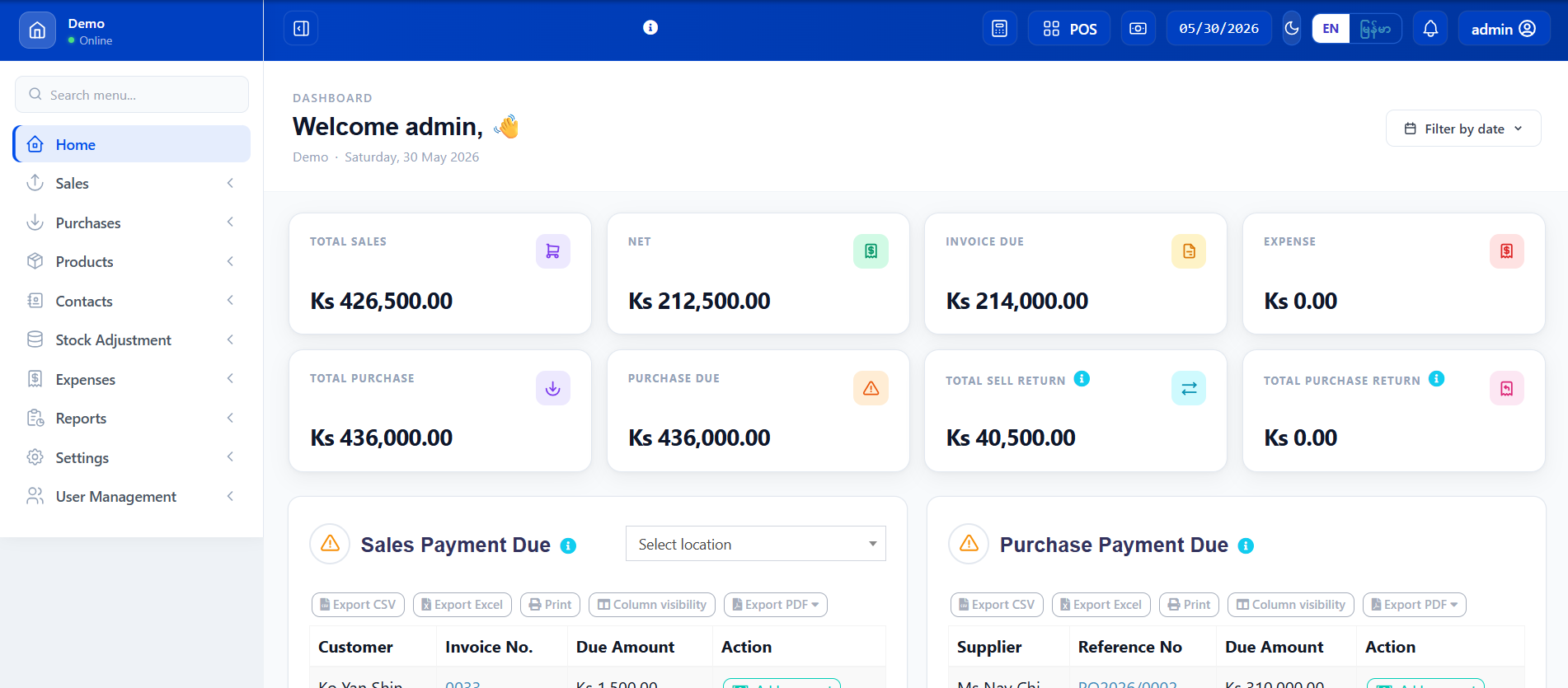
Ayar POS web dashboard
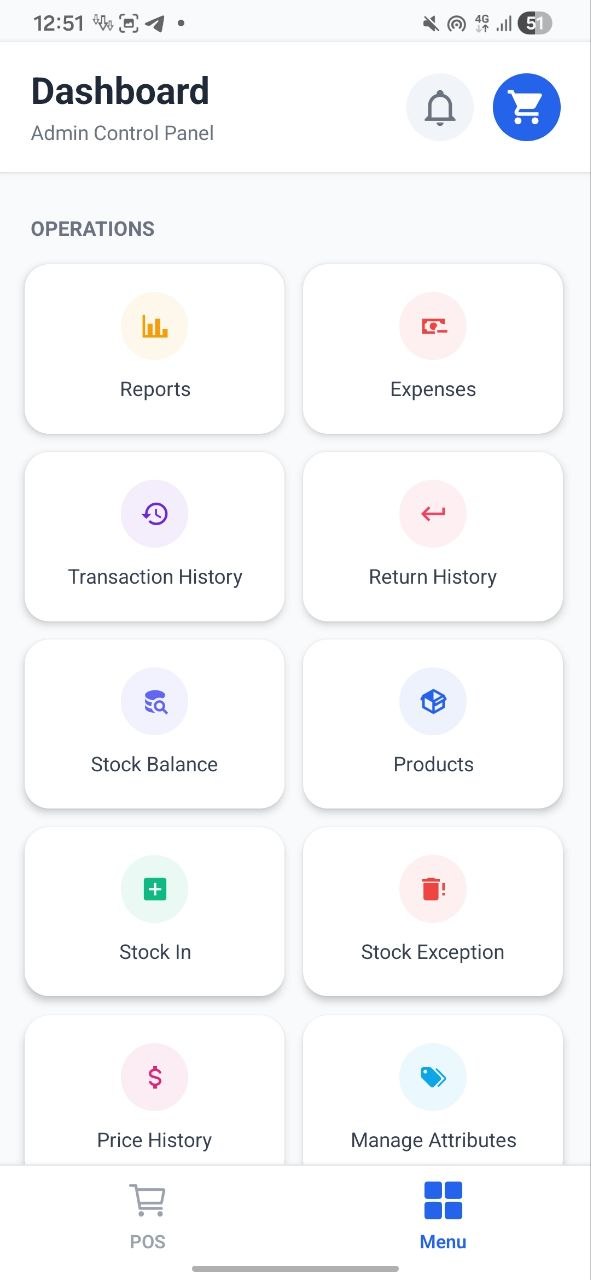
Ayar POS Android sales screen
Web + AndroidOwner and cashier tools stay connected.ဆိုင်ရှင်နဲ့ Cashier အတွက် ချိတ်ဆက်ထားသောစနစ်
Online + OfflineKeep selling on Android during network interruptions.Internet ပြတ်ချိန် Android မှာ ဆက်ရောင်းနိုင်
1 month freeTry the real product before choosing a plan.Plan မရွေးခင် တကယ်စမ်းသုံးနိုင်
Myanmar-firstLocal workflows, payments and support.မြန်မာလုပ်ငန်းပုံစံ၊ ငွေပေးချေမှုနဲ့ Support
One connected platformချိတ်ဆက်ထားသော Platform

Core tools for day-to-day shop operationsနေ့စဉ်ဆိုင်လုပ်ငန်းအတွက် လိုအပ်သော အဓိက Tools များ

Every sale updates the information you need next—from stock and customer balances to profit and daily reports.ရောင်းချမှုတိုင်းက Stock၊ Customer လက်ကျန်၊ Profit နဲ့ နေ့စဉ် Report တွေကို တစ်ဆက်တည်း အပ်ဒိတ်လုပ်ပေးပါတယ်။

Sell fasterရောင်းချမှု ပိုမြန်

Barcode, payments, receipts and returns in one clean checkout flow.Barcode၊ ငွေပေးချေမှု၊ ဘောက်ချာနဲ့ Return ကို တစ်နေရာတည်းမှာ လုပ်နိုင်ပါတယ်။

Learn moreပိုမိုသိရှိရန်

Know your stockStock ကို အမြဲသိ

Track purchases, pack-to-unit costing, adjustments and low-stock alerts.အဝယ်၊ Pack-to-unit ကုန်ကျ၊ Stock ပြင်ဆင်မှုနဲ့ Stock နည်း Alert များ။

Learn moreပိုမိုသိရှိရန်

Deliver with clarityDelivery ကို ရှင်းလင်းစွာ

Follow order status, delivery progress and pending collections without separate sheets.Order status၊ Delivery အခြေအနေနဲ့ ကောက်ခံရန်ကျန်ငွေကို သီးခြားစာရင်းမလိုဘဲ သိနိုင်ပါတယ်။

Learn moreပိုမိုသိရှိရန်

Control customer dueအကြွေးစာရင်း ထိန်းချုပ်

Record credit sales and collect partial or full payments with a clear history.အကြွေးရောင်းခြင်းနဲ့ တစ်စိတ်တစ်ပိုင်း/အပြည့် ကောက်ခံမှုများကို History နဲ့ မှတ်တမ်းထားနိုင်ပါတယ်။

Learn moreပိုမိုသိရှိရန်

See the real numbersအချက်အလက်မှန်ကို သိ

Daily sales, expenses, profit and Excel reports—ready when you need them.နေ့စဉ်အရောင်း၊ ကုန်ကျ၊ Profit နဲ့ Excel Report တွေ အချိန်မရွေး ကြည့်နိုင်ပါတယ်။

Learn moreပိုမိုသိရှိရန်

Ask your businessလုပ်ငန်းအကြောင်း မေးမြန်း

Ask Ayar AI about sales, stock and reports in Myanmar or English. Read-only by design.အရောင်း၊ Stock နဲ့ Report များကို မြန်မာ/English လို မေးနိုင်ပြီး Read-only အဖြစ် လုံခြုံပါတယ်။

Learn moreပိုမိုသိရှိရန်
Live business overviewအချိန်နဲ့တပြေးညီ အခြေအနေ

Business information in one dashboardလုပ်ငန်းအချက်အလက်များကို Dashboard တစ်ခုတည်းမှာ ကြည့်ပါ

Ayar POS turns daily activity into a clear operating view—without waiting for someone to prepare a spreadsheet.Excel စာရင်းပြင်ပေးမယ့်သူကို စောင့်စရာမလိုဘဲ နေ့စဉ်လုပ်ငန်းအခြေအနေကို ရှင်းရှင်းလင်းလင်း မြင်နိုင်ပါတယ်။

Today’s sales and cash movementယနေ့အရောင်းနဲ့ ငွေဝင်ငွေထွက်
Low-stock and out-of-stock attentionStock နည်း/ကုန် ပစ္စည်းများ
Customer due and payment collectionCustomer ကြွေးနဲ့ ကောက်ခံမှု
Delivery orders still requiring actionဆက်လုပ်ရန်ကျန် Delivery order များ
Ayar POS dashboard showing sales and stock information
Work from anywhereနေရာမရွေး အသုံးပြု

Use Ayar POS on Web and AndroidAyar POS ကို Web နဲ့ Android မှာ အသုံးပြုနိုင်ပါတယ်

For owners & managersဆိုင်ရှင်နဲ့ Manager အတွက်

Web Dashboard

Manage products, purchases, staff, reports and every location from a full business dashboard.ပစ္စည်း၊ အဝယ်၊ ဝန်ထမ်း၊ Report နဲ့ Branch များကို Business Dashboard အပြည့်အစုံကနေ စီမံပါ။

Ayar POS web dashboard
For counter & mobile salesCounter နဲ့ Mobile Sales အတွက်

Android POS

Sell, scan barcodes and print receipts from Android. If the network drops, keep selling and sync later.Android ကနေ ရောင်း၊ Barcode scan နဲ့ Receipt ထုတ်နိုင်ပါတယ်။ Internet ပြတ်ရင် ဆက်ရောင်းပြီး နောက်မှ Sync လုပ်နိုင်ပါတယ်။

Live stock syncStock ချက်ချင်း Sync
Offline queueOffline ရောင်းချမှု
Receipt printingReceipt ထုတ်နိုင်
Ayar POS Android app
Optional assistant toolsထပ်ဆောင်း Assistant Tools

Check shop information more easilyဆိုင်အချက်အလက်ကို ပိုလွယ်ကူစွာ စစ်ဆေးပါ

These tools help owners review existing information. They do not replace the core POS workflow or edit business records automatically.ဒီ Tools များက ရှိပြီးသားဆိုင်အချက်အလက်ကို စစ်ဆေးဖို့ ကူညီပေးတာဖြစ်ပြီး အဓိက POS လုပ်ငန်းစဉ်ကို အစားမထိုးသလို Record များကို အလိုအလျောက် မပြင်ပါဘူး။

Shop Assistant Lite
A read-only daily overview of sales, stock, customer due and delivery.အရောင်း၊ Stock၊ Customer ကြွေးနဲ့ Delivery ကို Read-only နေ့စဉ်ကြည့်နိုင်ပါတယ်။
Ask Ayar AI
Ask questions about existing shop data in Myanmar or English. It cannot edit records.ရှိပြီးသားဆိုင် Data ကို မြန်မာ/English လို မေးနိုင်ပြီး Record များကို မပြင်နိုင်ပါ။
Auto Reports
Receive scheduled Excel reports by email, with Telegram available on supported plans.Excel Report များကို Email မှ အချိန်မှန်ရရှိပြီး သတ်မှတ် Plan မှာ Telegram လည်းသုံးနိုင်ပါတယ်။
Made for real shopsတကယ့်ဆိုင်များအတွက်

Suitable for common Myanmar retail businessesမြန်မာ Retail လုပ်ငန်းအမျိုးအစားများအတွက် သင့်တော်ပါတယ်

Ayar POS fits everyday Myanmar retail workflows—from a single counter to multiple locations.Counter တစ်ခုတည်းရှိတဲ့ဆိုင်ကနေ Branch အများရှိတဲ့လုပ်ငန်းအထိ မြန်မာ Retail ပုံစံနဲ့ ကိုက်ညီပါတယ်။

Grocery & Mini Martကုန်စုံဆိုင် / Mini Mart
Pharmacyဆေးဆိုင်
Fashion & Beautyအဝတ်အထည် / အလှကုန်
Electronicsအီလက်ထရောနစ်
Online Sellerအွန်လိုင်းရောင်းချသူ
Stationeryစာရေးကိရိယာ
Multi-branch RetailBranch အများရှိဆိုင်
FAQမေးလေ့ရှိသောမေးခွန်းများ

Frequently asked questionsမေးလေ့ရှိသောမေးခွန်းများ

What is Ayar POS?Ayar POS ဆိုတာ ဘာလဲ?
Ayar POS is a Web and Android POS system for Myanmar shops. It helps manage sales, stock, customer due, expenses, delivery orders, and reports from one connected system. Ayar POS က မြန်မာဆိုင်တွေအတွက် Web နဲ့ Android နှစ်ခုလုံးသုံးလို့ရတဲ့ POS စနစ်ပါ။ အရောင်း၊ Stock၊ ဖောက်သည်ကြွေး၊ ကုန်ကျစရိတ်၊ Delivery order နဲ့ Report တွေကို တစ်နေရာတည်းကနေ ကြည့်ပြီး စီမံလို့ရပါတယ်။
Can I use Ayar POS on Android?Android ဖုန်းနဲ့ သုံးနိုင်ပါသလား?
Yes. You can make sales, scan barcodes, check stock, collect customer due, and sync with the Web dashboard from the Android app. သုံးလို့ရပါတယ်။ Android app ကနေ ရောင်းတာ၊ barcode scan လုပ်တာ၊ stock စစ်တာ၊ ဖောက်သည်ကြွေးကောက်တာတွေ လုပ်နိုင်ပြီး Web dashboard နဲ့လည်း data sync ဖြစ်ပါတယ်။
Can the Android app work offline?Internet မရှိရင် Android app သုံးလို့ရပါသလား?
Yes. The Android app supports offline sales. When the internet comes back, sales data can sync back to the Web dashboard. ရပါတယ်။ Internet မရှိတဲ့အချိန်မှာလည်း Android app နဲ့ ရောင်းထားလို့ရပါတယ်။ Internet ပြန်ရလာတဲ့အခါ Web dashboard ထဲကို data ပြန် sync လုပ်လို့ရပါတယ်။
Does Ayar POS support customer credit?Customer ကြွေးစာရင်း ကိုင်လို့ရပါသလား?
Yes. You can record credit sales, view outstanding balances by customer, and collect partial or full payments anytime. ရပါတယ်။ အကြွေးရောင်းတာ မှတ်ထားလို့ရပြီး customer တစ်ယောက်ချင်းစီရဲ့ ကြွေးကျန်ကို ကြည့်လို့ရပါတယ်။ ငွေတစ်စိတ်တစ်ပိုင်းပေးတာ၊ အပြည့်ပေးတာတွေလည်း မှတ်လို့ရပါတယ်။
Does Ayar POS support stock and low-stock alerts?Stock နဲ့ stock နည်း alert တွေရှိပါသလား?
Yes. Ayar POS tracks product stock, purchases, adjustments, and low-stock items so you can know what needs attention. ရှိပါတယ်။ ပစ္စည်းလက်ကျန်၊ အဝယ်၊ stock ပြင်ထားတာတွေကို ကြည့်လို့ရပြီး stock နည်းနေတဲ့ပစ္စည်းတွေကိုလည်း သိနိုင်ပါတယ်။ ဘာတွေပြန်ဖြည့်ရမလဲဆိုတာ ပိုရှင်းပါတယ်။
Can I use barcode scanner and receipt printer?Barcode scanner နဲ့ receipt printer သုံးလို့ရပါသလား?
Yes. Ayar POS supports barcode-based sales and receipt printing depending on your device and printer setup. ရပါတယ်။ သုံးမယ့် device နဲ့ printer setup ပေါ်မူတည်ပြီး barcode နဲ့ရောင်းတာ၊ ဘောင်ချာ print ထုတ်တာတွေ သုံးလို့ရပါတယ်။
How can I make a payment?Payment ကို ဘယ်လိုပေးရမလဲ?
You can pay by bank transfer, mobile payment, or other supported payment methods. After payment, send the payment screenshot or transaction details to support for confirmation. Bank transfer၊ mobile payment ဒါမှမဟုတ် support လုပ်ထားတဲ့ payment method တွေနဲ့ ပေးချေလို့ရပါတယ်။ ငွေလွှဲပြီးရင် confirmation လုပ်ဖို့ payment screenshot သို့မဟုတ် transaction details ကို support ထံ ပေးပို့ပေးပါ။
Can I assign user roles and permissions?User role/permission ခွဲပေးလို့ရပါသလား?
Yes. You can assign different roles and permissions to staff members, such as owner, manager, cashier, or staff, depending on what each person needs to access. ရပါတယ်။ Staff တစ်ယောက်ချင်းစီအတွက် owner၊ manager၊ cashier၊ staff စတဲ့ role တွေခွဲပြီး ဘာတွေသုံးခွင့်ရှိမလဲဆိုတာ permission နဲ့ သတ်မှတ်ပေးလို့ရပါတယ်။
Can staff see sensitive data?Staff တွေက sensitive data တွေ မြင်နိုင်မလား?
Staff can only see the data allowed by their assigned role and permissions. Sensitive information such as profit, reports, settings, or customer dues can be restricted from certain staff members. Staff တွေက သူတို့ကိုပေးထားတဲ့ role နဲ့ permission အရ ခွင့်ပြုထားတဲ့ data တွေကိုပဲ မြင်နိုင်ပါတယ်။ Profit၊ reports၊ settings၊ customer due လို sensitive information တွေကို staff အချို့မမြင်ရအောင် ကန့်သတ်ထားလို့ရပါတယ်။
Can I see sales and profit reports?အရောင်းနဲ့ အမြတ် report ကြည့်လို့ရပါသလား?
Yes. You can view daily sales, expenses, stock movement, customer due, and business reports from the dashboard. ရပါတယ်။ Dashboard ထဲမှာ နေ့စဉ်အရောင်း၊ ကုန်ကျစရိတ်၊ stock အဝင်အထွက်၊ customer ကြွေးနဲ့ လုပ်ငန်း report တွေကို ကြည့်လို့ရပါတယ်။
Do you help with setup and training?Setup နဲ့ သုံးနည်း ကူညီပေးပါသလား?
Yes. We can help with initial setup and guide your team on how to use the POS workflow. ကူညီပေးပါတယ်။ စစချင်း setup လုပ်တာနဲ့ သင့် team ကို POS သုံးနည်း ပြောပြပေးတာတွေ ကူညီပေးနိုင်ပါတယ်။
Can I start with the Demo Plan?Demo Plan နဲ့ စလိုရပါသလား?
Yes. You can use the Demo Plan free for 1 month. No credit card is required. You can test Web POS, Products, Sales, and basic Reports. ရပါတယ်။ Demo ကို ၁ လ အခမဲ့ စမ်းသုံးလို့ရပါတယ်။ Credit card မလိုပါဘူး။ Web POS၊ Products၊ Sales နဲ့ အခြေခံ Report တွေကို အရင်စမ်းကြည့်လို့ရပါတယ်။
Can I upgrade later?နောက်မှ Upgrade လုပ်လိုရပါသလား?
Yes. You can upgrade to a higher plan at any time. To upgrade, please contact +959969379186. ရပါတယ်။ နောက်မှ ဆိုင်အတွက် ပိုလိုလာရင် Plan မြှင့်လို့ရပါတယ်။ Upgrade လုပ်ချင်ရင် +959969379186 ကို ဆက်သွယ်ပေးပါ။
Can I get my data back after my subscription ends?Subscription သက်တမ်းကုန်သွားရင် data ပြန်ယူလို့ရပါသလား?
Yes. After your subscription ends, you can request your business data, and we will provide it back to you as an Excel file. ရပါတယ်။ Subscription သက်တမ်းကုန်သွားပြီးနောက် သင့်လုပ်ငန်း data ကို တောင်းဆိုနိုင်ပါတယ်။ ကျွန်တော်တို့ဘက်က Excel file အနေနဲ့ ပြန်ထုတ်ပေးနိုင်ပါတယ်။

Start with a free trialအခမဲ့ စမ်းသုံးပြီး စတင်ပါ

See whether Ayar POS fits your shopAyar POS က သင့်ဆိုင်နဲ့ ကိုက်ညီမှုရှိမရှိ စမ်းသုံးကြည့်ပါ

Try Ayar POS free for one month. No credit card, no complicated setup—just a better way to see and run your business.Ayar POS ကို ၁ လ အခမဲ့ စမ်းသုံးပါ။ Credit card မလို၊ Setup မရှုပ်ဘဲ သင့်လုပ်ငန်းကို ပိုကောင်းစွာ သိမြင်စီမံနိုင်ပါတယ်။